Features
How HuntReserve works
Every feature, in plain English. Every feature here comes with every package. Full Draw and Trophy Class add a marketing team that keeps your calendar full.
The short answer
What is outfitter management software?
Outfitter management software is one system that books your hunts, collects waivers and licenses, takes deposits and balances, and runs the season from the office and the field. HuntReserve does this for hunting outfits, guides, lodges and fishing charters, and adds marketing through its partner, a leading national marketing agency.
Booking desk
Getting the booking
Hunters find you, ask about a hunt, and book it, on your website and your terms.
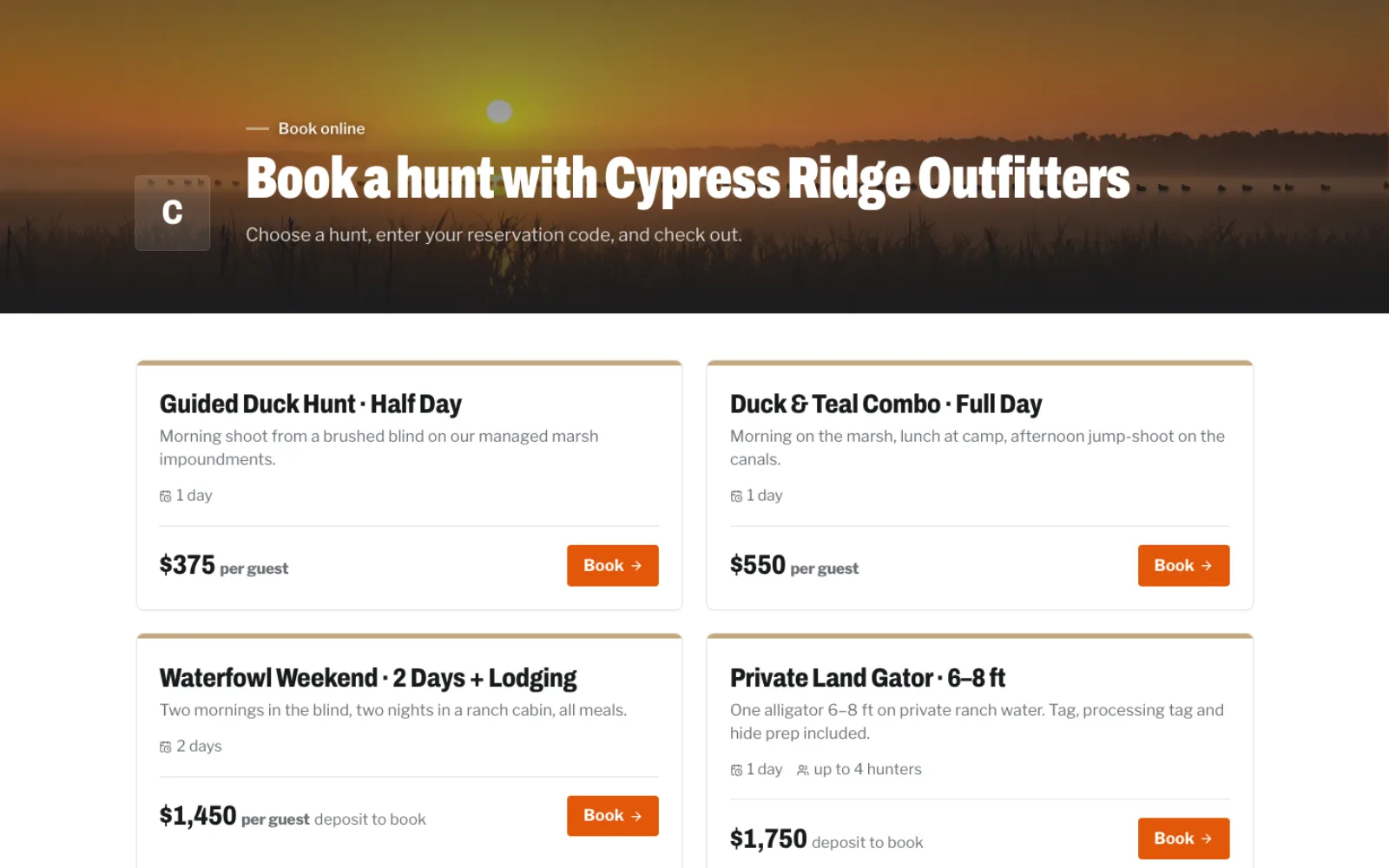
Your booking page
Every outfitter gets a booking page listing your published hunts with photos, what's included and the price. Put a Book button on your own website or embed the page right in it. Hunters pick a date, party size, add-ons and lodging, and see the total update as they go.
Inquiry forms
Add an inquiry form to your site in a minute. Each request lands on your Inquiries board with the hunt, dates, party size and where it came from, and you get an email and a notification right away.
Approve before they book
For private-land and high-end hunts, approve the hunters you want first. Each approved hunter gets a one-time code to book, so nobody books a spot you didn't offer.
Packages and add-ons
Set up each hunt with its price per hunter, per day or flat, deposit rules and what's included. Extra birds, trophy fees, processing or meals are add-ons. Everything syncs to your own Stripe automatically.
AI quote drafts
Open an inquiry and click Draft reply. HuntReserve reads the request, picks the right package, works out the price with your real rates, and writes a friendly reply in your voice. You edit and send it; nothing goes out on its own.
Hunters and paperwork
Every hunter ready before opening day
Waivers, licenses and details come from the hunters themselves, before they ever reach camp.
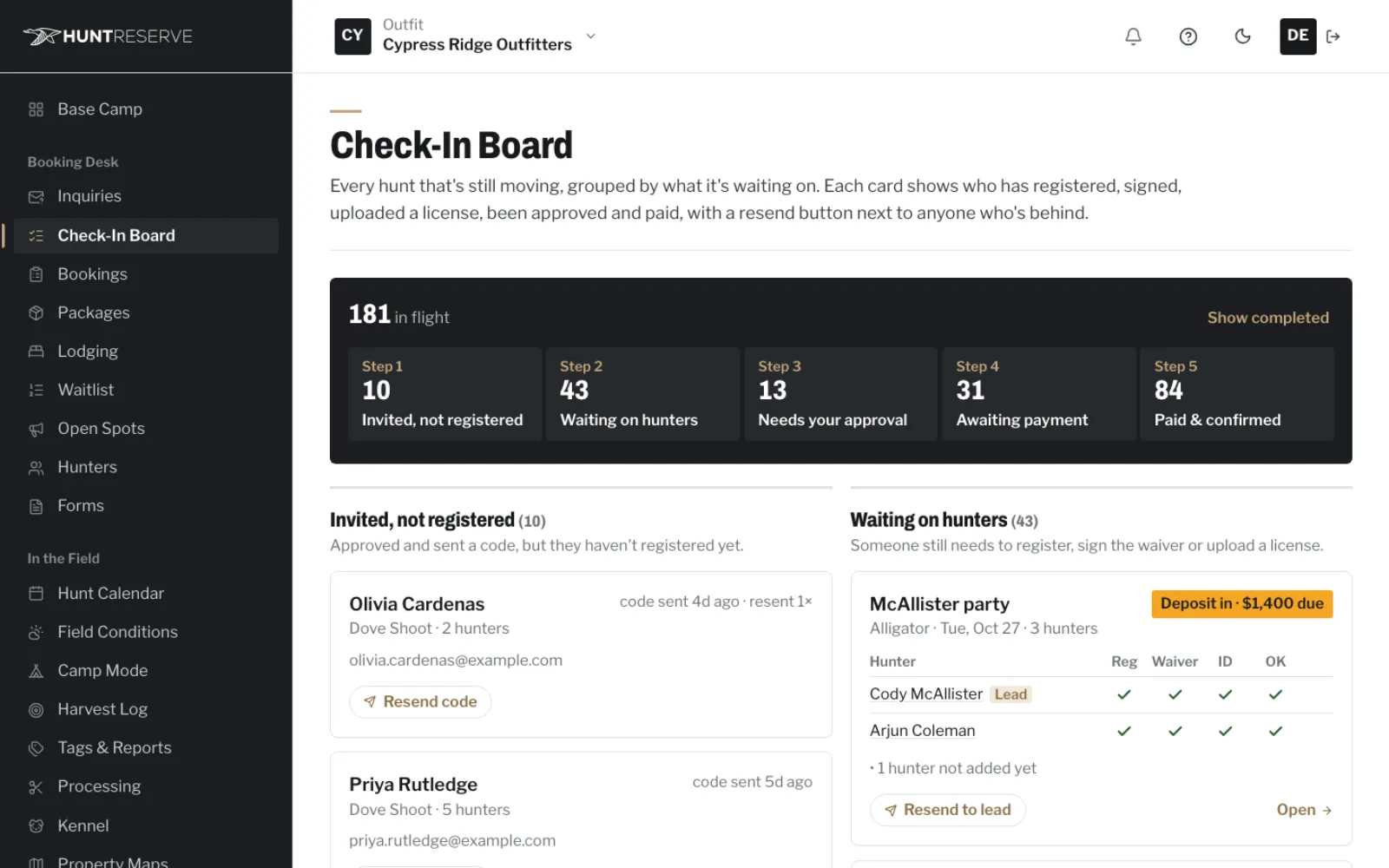
Every hunter registers
The lead hunter gets a link to add the rest of the party. Each hunter fills in their own details, signs the waiver and uploads their license from their phone. You never retype a thing.
Waivers, with kids covered
Upload your own waiver. Hunters sign it on screen and get a copy by email. Hunters under 18 sign with a parent or guardian co-signing on the same form.
License scan and name match
When a hunter uploads their driver's license, HuntReserve reads it and checks the name against their waiver signature. Blurry photos, the back of the card and expired licenses get flagged before the hunt.
Check-In Board
One board shows every party and every hunter: who has registered, signed, uploaded a license, been approved and paid. Anyone behind gets a one-click reminder.
Camp Mode
No signal at camp? Open Camp Mode on a tablet once while online. Waivers, guardian signatures and license photos are captured offline and sync automatically when you're back in range.
Verified Hunter Pass
Hunters can verify their ID, hunting license and hunter-safety card once and reuse them with any outfitter on HuntReserve. They choose who sees their documents and can stop sharing any time.
Money
Get paid without chasing anyone
Deposits, balances and refunds run through your own Stripe account, and the books keep themselves.
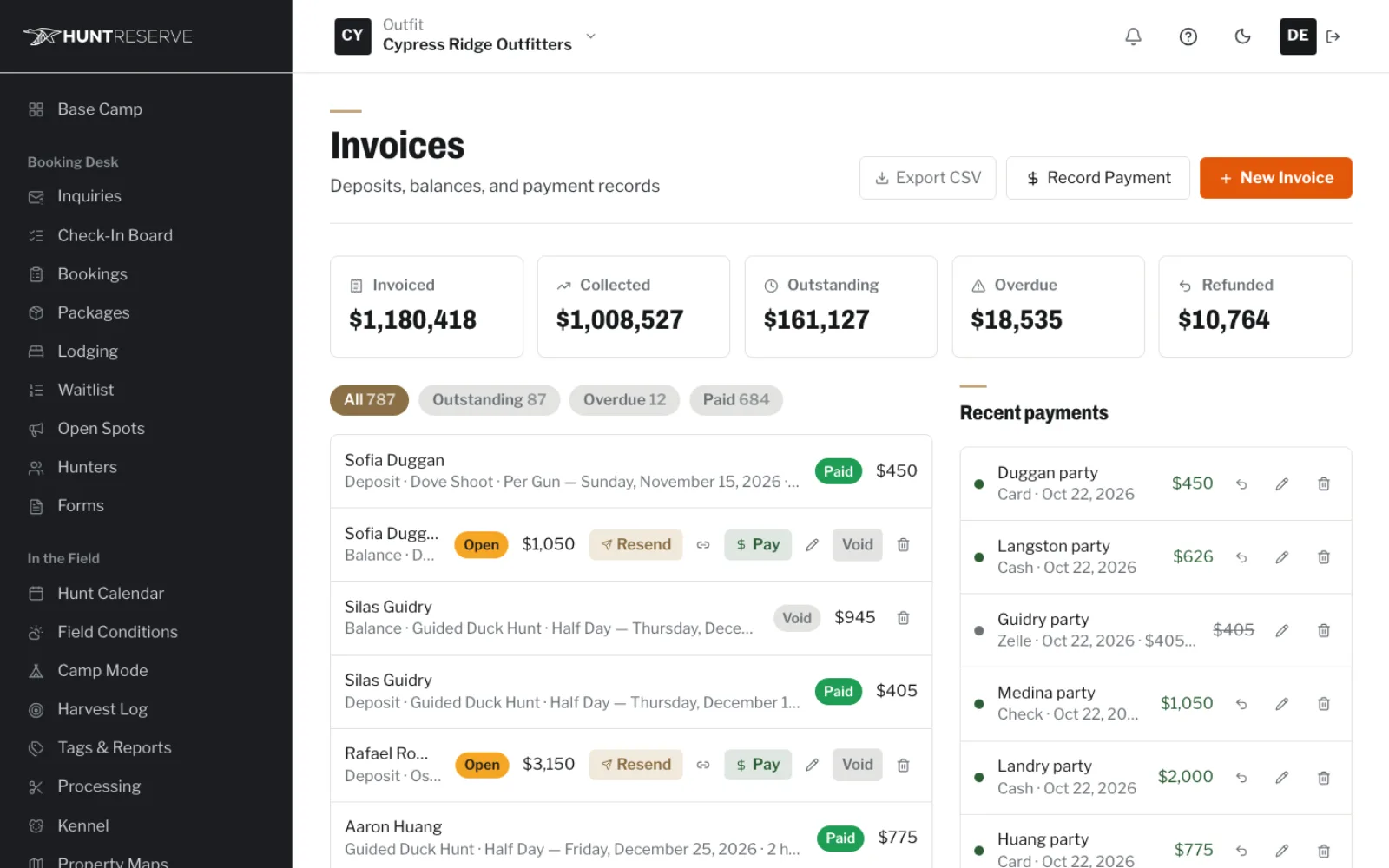
Deposits and balances
Take a deposit when they book. The balance is invoiced automatically before the hunt, with a pay link by email. Overdue balances get a reminder.
Your own Stripe
Payments go straight into your Stripe account. Card processing is Stripe's standard rate, and you choose whether you or the hunter covers it.
Refunds and records
Refund a card payment in one click, or record cash, check, Venmo and Zelle. Every payment shows on the booking and the invoice.
QuickBooks sync
Customers, invoices, payments, refunds and expenses flow into QuickBooks Online on their own, so your accountant is happy.
Expenses and profit & loss
Log fuel, feed, leases and guide pay. See profit and loss by month and by hunt.
In the field
Running the hunt
From the morning forecast to the hide coming back from the tannery.
Hunt Calendar
See every hunt by day with how full each hunt type is against its daily limit, plus events and blackout days. Switch to a month grid any time.
Field conditions
Weather for your camp: hourly and 16-day forecasts, wind direction and gusts, pressure trend, sunrise and sunset, moon phase and river levels from nearby USGS gauges, with the source shown for each.
Lodging and rooms
Add your cabins and rooms with how many each sleeps and the nightly price. Book stays alongside the hunt, see an occupancy grid, and lodging is priced right into the booking.
Harvest Log and season stats
Log each hunt's harvest by species, location and guide. Season totals, success rates and birds per hunter build themselves.
Tags and harvest reports
Keep a register of your tags and your clients' tags. When a harvest is logged, the state report is pre-filled with a countdown to the deadline, ready to copy into the state's site.
Processing tracker
Track hides, meat, skulls and mounts through processing. Hunters get a status page and a text or email at each step.
Kennel
Keep each dog's profile and log every retrieve, with season tallies per dog.
Property maps and gear
Draw your fields, blinds and stands on the map and log harvests where they happened. Track gear, ammo and feed with low-stock alerts.
Keep them coming back
Fewer empty spots, more repeat hunters
The follow-up that fills next season happens on its own.

Automatic reminders
Balance due, missing paperwork, what to bring and a day-before message, by email and text. Turn each one on and pick the timing.
Waitlist that refills
When a hunt is full, hunters join the waitlist. A cancellation offers the spot to the next hunter with a 24-hour claim link.
Open Spots
Push a last-minute opening to your approved hunters and see who books from it.
Post-hunt feedback
After each hunt, hunters rate it privately and upload trophy photos. You see every rating and comment, and the best photos can go on your Trophy Wall with their permission.
Trophy Wall
Your best hunt photos in one place, with hunters' permission to share them on your site and social media.
Hunter portal and memberships
Hunters log in to see their hunts, documents and harvest photos. Run clubs, leases and season passes with members, dues and a running ledger.
Camp office
Your whole operation on one screen
Base Camp shows today's hunts, the weather, money in and what needs you, the moment you log in.
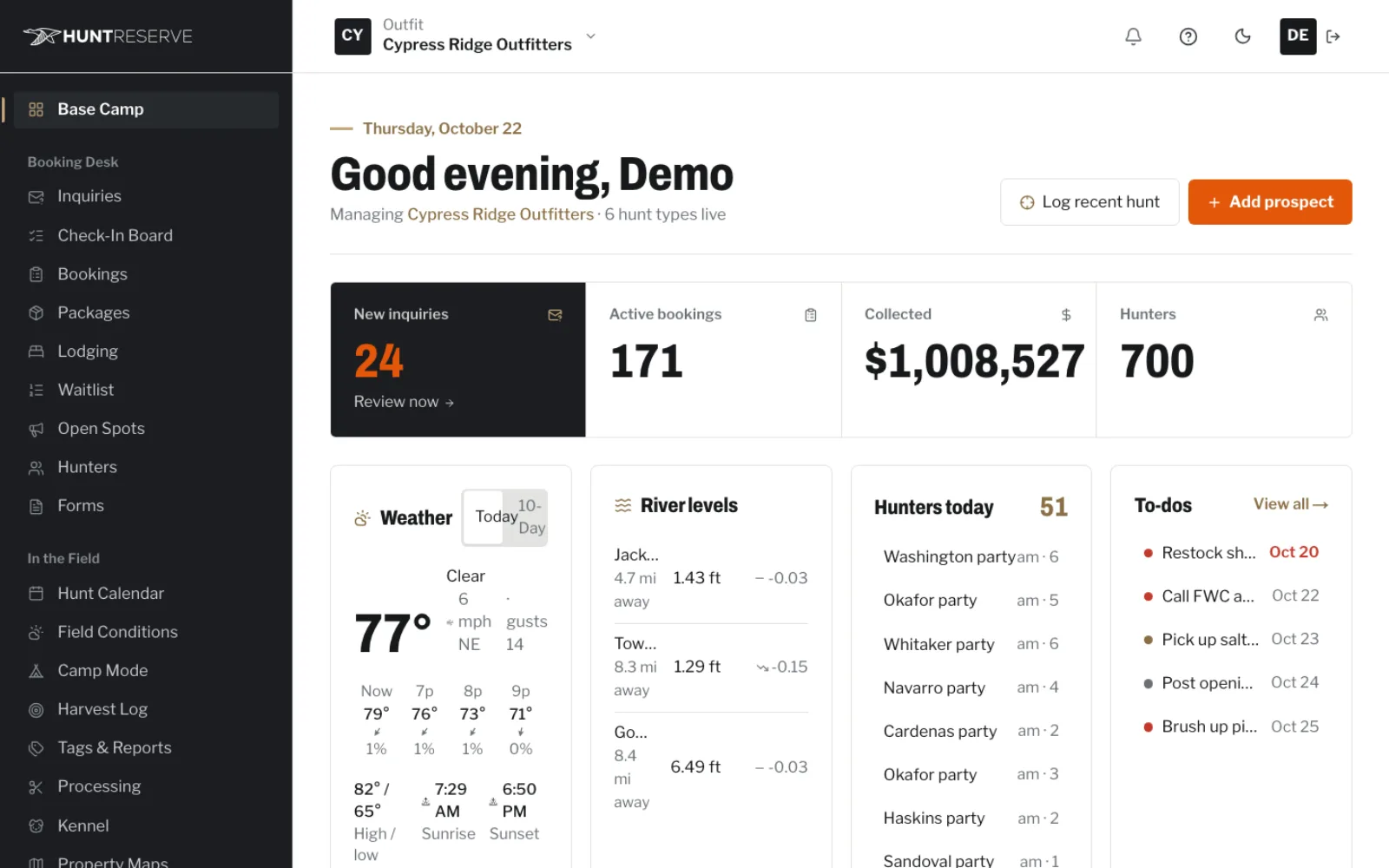
Base Camp
Today's hunts, new inquiries, money collected, weather and river levels, to-dos and season performance, all on one page.
Guides and staff
Invite guides and staff with the right access: owners and managers see money, guides see their hunts.
Messages and Camp Chat
Text or email hunters from their record, and keep your crew talking in Camp Chat instead of a dozen group texts.
Notifications and activity
Get a notification for every new inquiry, payment and signed waiver, and see a full activity log of who did what.
Settings that fit your outfit
Your logo, waivers, required documents, payment rules, reminders and booking fee settings in one organized place.
Buyer's guide
The 36 features are listed above. These are the questions outfitters ask about outfitter management software before they switch, answered plainly, with what HuntReserve does and what it doesn't.
What does outfitter management software replace?
Outfitter management software replaces the pile of separate tools most outfits run on: a spreadsheet or wall calendar for dates, paper waivers in a binder, a payment app for deposits, a website builder, and a phone full of group texts. Each one works on its own. None of them talk to each other, so you end up retyping the same hunter's name five times.
When the booking, the paperwork and the money live in one outfitter management software account, the questions you ask every morning have one answer: who's coming, who still owes, who hasn't signed, and which blind or boat they're in.
| What you use now | What takes its place in HuntReserve |
|---|---|
| Spreadsheet or wall calendar | Hunt Calendar with daily capacity for each hunt type |
| Paper waivers and license photocopies | On-screen waivers, guardian co-sign and license upload from each hunter's phone |
| A separate payment app | Deposits and balances through your own Stripe, plus cash, check, Venmo and Zelle recorded |
| A separate website builder | Your own custom site and domain, with a Book button, in every package |
| Group texts with your crew | Camp Chat, plus texts and emails to hunters from their record |
| A notebook for harvests | Harvest Log, season stats and pre-filled state harvest reports |
How does a season run through HuntReserve, start to finish?
In good outfitter management software, a season runs in one straight line: inquiry, booking, paperwork, payment, the hunt, then the follow-up. Here is what that looks like for a single party of four.
- A hunter finds your site and sends an inquiry. It lands on your Inquiries board, and Draft reply writes a quote with your real rates for you to edit and send.
- They book a date on your booking page and pay the deposit. If the hunt is private-land or invite-only, they book with the one-time code you gave them.
- The lead hunter forwards a link. All four register, sign your waiver and upload their licenses from their phones. Anyone under 18 signs with a parent or guardian.
- The Check-In Board shows who's still missing something, and reminders go out on the schedule you picked.
- The balance is invoiced before the hunt. If you turned on per-hunter payments, each hunter pays their own share.
- Hunt day: the forecast, wind, moon and river gauges are on Base Camp, and guides see only their own hunts.
- After the hunt, you log the harvest, the state report is pre-filled and ready to copy, and each hunter is asked to rate the trip.
If someone cancels, the waitlist sends the next hunter in line a claim link that holds the spot for 24 hours, so the date doesn't sit empty.
Is every outfitter management software feature in every package?
Yes. Every feature on this page comes with every package. All three tiers include the complete toolset and a custom site on your domain. The difference is how much marketing work is done for you, how big the website is, and whether a booking fee applies.
| Opening Day | Full Draw | Trophy Class | |
|---|---|---|---|
| Monthly price | $159 | $329 | $899 |
| Full HuntReserve platform | Yes | Yes | Yes |
| Custom website | Up to 5 pages + contact form | Up to 10 pages | Up to 25 pages |
| Booking fee on online card bookings | 2% | 0% | 0% |
| Tracking and monthly report | Yes | Yes | Yes |
| Local SEO, AI search, monthly content, Google Business Profile management | No | Yes | Yes |
| Google Ads and Meta ads management | No | Yes | Full ads |
| Social media and a dedicated strategist | No | No | Yes |
Ad budgets aren't part of the package price; you pay Google and Meta for those yourself. The marketing work is done by our marketing team, a national agency that specializes in getting local businesses found and turning searches into leads. If you only want the software and a small site, Opening Day is the honest pick.
Who owns the money and the data in outfitter management software?
With HuntReserve, you do. Payments go straight into your own Stripe account, not into someone else's account first. Processing fees follow Stripe's published pricing at the standard rate, and you decide who absorbs them: you or the hunter.
Your books stay yours too. Customers, invoices, payments, refunds and expenses sync to QuickBooks Online, so your accountant works from the same numbers you see. Your hunters are your customers: there is no marketplace listing your hunts next to the outfit down the road.
That is the main thing to check in any outfitter management software. Ask where the money lands, who holds the customer list, and what a booking fee costs you on a full season. Opening Day carries 2% on online card bookings; the two marketing packages carry none.
How hard is it to switch to new outfitter management software?
Switching outfitter management software starts with a call, not a sign-up form. We call, show you HuntReserve set up with your hunts and prices, and get your account running. You don't have to move everything on day one.
You can keep your current website and drop a Book button onto it (or embed the whole booking page), or move to the custom site that comes with your package. You upload your own waiver, set up each hunt with its price, deposit rules and add-ons, add your cabins and rooms if you run lodging, and invite your guides. On Trophy Class the setup is done for you.
The easiest time to change is between seasons, before deposits start coming in. Request a call and we'll look at your calendar with you.
Does it work at camp with no cell signal?
Yes, for the paperwork that has to happen at camp. Plenty of camps sit where a phone shows no bars, so outfitter management software has to cope with that. Load Camp Mode on a tablet one time with a connection. From then on the tablet collects waivers, parent or guardian signatures and photos of licenses with no signal, and uploads everything once it reconnects.
Most of the paperwork never reaches camp anyway, because hunters sign and upload from their phones before they leave home. Camp Mode covers the walk-up hunter, the friend who joined the party late and the kid whose parent signs at the truck.
How do staff roles and guide access work?
You invite guides and staff, and each one gets the access their job needs. That separation is one reason to use outfitter management software instead of a shared spreadsheet. Owners and managers see the money; guides see their own hunts, their hunters and what still needs doing.
Everything a person does is recorded in the activity log, so you can see who checked in a party, who recorded a cash payment and who changed a date. Your crew talks in Camp Chat instead of a dozen group texts, and you text or email a hunter right from their record.
Who is HuntReserve's outfitter management software built for?
HuntReserve fits outfits that sell guided days, seats, blinds or boat spots by date, and want the booking, paperwork and payments handled in one place. That covers hunting outfitters, lodges, preserves, clubs and fishing charters.
It is not a marketplace. If you want a platform that sends you hunters from its own listings, that is a different kind of product. HuntReserve and its marketing team grow your own outfit instead: your website, your Google listing and your repeat hunters.

Questions
What outfitters ask about the software
Is there a phone app for hunters and guides?
HuntReserve runs in the phone's web browser, so there is nothing to download from a store. Hunters register, sign and upload their licenses from a link, and guides open their hunts the same way. Camp Mode on a tablet handles waivers and license photos where there is no signal.
Can every hunter in a party pay separately?
They can. Switch on per-hunter payments and each person in the group is sent a separate pay link, which keeps one guy from covering four hunters on his card. Leave the setting off and the lead hunter gets one invoice for the full balance, with reminders before it's due.
Does HuntReserve file harvest reports with the state?
No. When you log a harvest, HuntReserve fills in the state report for you and counts down to the deadline, so the answers are ready to copy over. You do the submitting. Templates for Florida alligator, deer and turkey come built in, next to a register of every tag you and your hunters hold.
Can I take cash, checks, Venmo or Zelle?
Yes. Cards run through Stripe in your name, and you can record cash, check, Venmo and Zelle payments by hand. Every payment shows on the booking and the invoice, and refunds on card payments take one click.
Does it handle lodging as well as hunts?
Yes. Enter each cabin or room, its bed count and its nightly rate. Stays are booked alongside the hunt, priced into the same booking, and an occupancy grid shows which beds are taken each night.
What does outfitter management software cost with HuntReserve?
It's one monthly price: $159 (Opening Day), $329 (Full Draw) or $899 (Trophy Class), with the whole platform and your website in each. Opening Day has a 2% booking fee on online card bookings; Full Draw and Trophy Class have none. Stripe charges its standard card rate, and ad spend is separate.
Will hunters see the HuntReserve name instead of mine?
Your booking page carries your outfit's name, your hunts and your photos, and the Book button sits on your own website. Hunters sign your waiver and their money lands in your Stripe, so the relationship stays between you and your hunters.
Can I try outfitter management software before committing?
There is no self-serve trial. Instead, someone from our team calls and runs through HuntReserve loaded with your hunts, prices and waiver, so you see how your season would actually run. Get started and pick a time.